How do I set up Outlook / Outlook
Express?
Here are some screen shots of the Outlook set up screens the way it
would look for an account at
TELEsites.Net. Access these menus by opening Outlook or Outlook Express (some versions
may look slightly different). Select TOOLS | SERVICES (or accounts) from the top menus.
Once the window opens hit the "ADD" button. Select Internet email. You will get
this screen: (note: Windows XP users -- screen shots are below.)
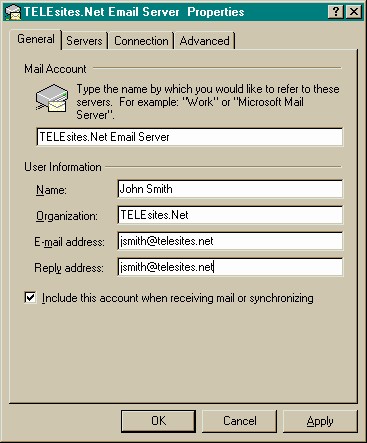
Fill out the above section using your_domain_name.com everywhere we have telesites.net listed
here. Then select the Servers tab at the top. You will see this screen:
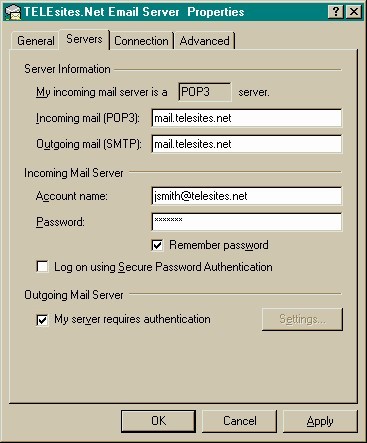
Again, where you see telesites.net enter your_domain_name.com. Enter your account name
and password in the "Incoming Mail Server" section. Use the check mark if you want the
computer to remember the password each time you log in or leave it uncheck for more security.
Note: It is very important that you check the Outgoing Mail Server box "My server
requires authentication" so that outbound email server is secure from outside parties who may
try to use your mail server for junk email sending or mail bombing. The default "Use
same settings as my incoming mail server" should be used under the settings button. In
this way all outbound mail will only be sent if your username and password are entered
correctly.
For Windows XP it would look like this:
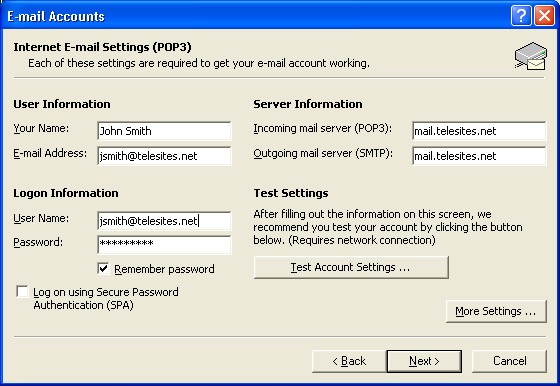
Fill out the above section using your_domain_name.com everywhere we have
telesites.net listed here.
Click the "More Settings" button to get this screen:
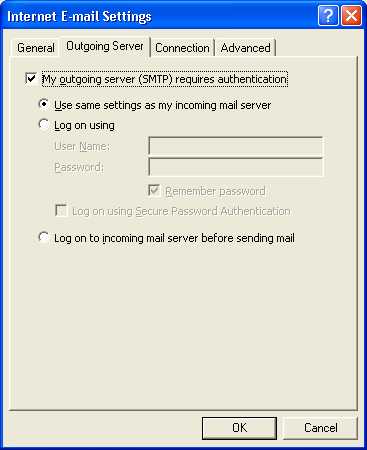
Note: It is very important that you check the Outgoing Mail Server box "My
outgoing server (SMTP) requires authentication" so that outbound email server is secure from
outside parties who may try to use your mail server for junk email sending or mail bombing.
The default "Use same settings as my incoming mail server" should be used. In this way
all outbound mail will only be sent if your username and password are entered correctly.
Why do I have
problems sending email
when my Cable / DSL Internet Service Provider has
blocked port 25 SMTP?
Recently many of the Cable and DSL Internet Service
Providers (ISP) have decided to stop any business email
traffic from going through their systems. They have
chosen to not allow any outbound email through their
system that does not have an email address that is with
their service. For this reason your domain name email
service may stop sending outbound mail and you will
begin to get non-delivery messages.
You can resolve this issue as follows:
Change the advanced settings for your outbound port
from port 25 to use port 2525. We have our email
services listening on both ports to resolve this issue.
Here are the settings for Windows XP using MS
Outlook: (see above details on how to arrive at this
page in your settings)
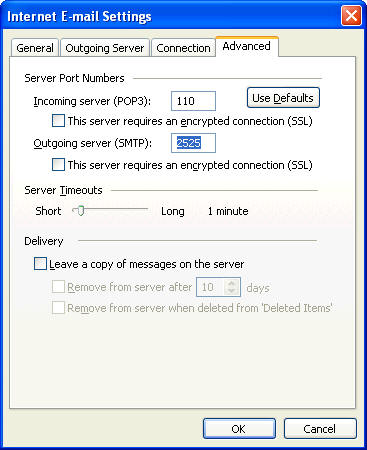
If you are using a different version of Outlook or
Outlook Express, the settings are the same but the
window will look a bit different.



